Try one plate.
Check every detail.
A repeatable way to check roster handling, proof consistency and SVG import behavior before a shop puts a real order into production.
These files exercise the software; they do not establish that a particular engraving app, machine or material works. The included internal review is labeled QA fixture — no customer approval. All recipients and organizations are fictional.
Start with the known-good roster.
- Use Open job in BatchProof to load
01-valid-reviewed.batchproof.json. Expect 12 records, zero blocking errors and three warned records. One row creates one plate. - Open
01-matching-proof.pdfand unzip01-artwork.zip. Compare all 12 recipients, their order, award, organization and year. The PDF, every SVG and the package manifest must reference the same proof ID. - Record your app version and browser. Try a fresh CSV import with
01-valid-roster.csv; compare the names and count. A fresh CSV import has new job metadata, so its proof ID can differ until the complete job metadata and sample status are identical. - Load the separate invalid and stale-review jobs below. Confirm that batch artwork remains disabled. Do not substitute their draft output into production.
This proof ID identifies the full fixture content, including job metadata and layout. It is a version checksum, not a verified signature.
Twelve plates, including deliberate edge cases.
| # | Fictional recipient | What this tests | Expected check |
|---|---|---|---|
| 1 | Jordan Ellis | Plain Latin name; intentional duplicate with row 12 | duplicate-name |
| 2 | Sofía Martínez | Acute accents | No automatic issue |
| 3 | María O’Connor | Accent and curly apostrophe | No automatic issue |
| 4 | Élodie Laurent | Accented initial | No automatic issue |
| 5 | Alexandra Montgomery-Wellington | Long hyphenated name; auto-fit expected | auto-fit |
| 6 | Chen, Kai | Quoted CSV comma | No automatic issue |
| 7 | Avery Smith-Jones | Hyphenated name | No automatic issue |
| 8 | Αλέξανδρος | Greek characters | No automatic issue |
| 9 | Ирина | Cyrillic characters | No automatic issue |
| 10 | Renée D’Arcy | Accents and curly apostrophe | No automatic issue |
| 11 | Morgan & Lee | Literal ampersand | No automatic issue |
| 12 | Jordan Ellis | Intentional duplicate with row 1; different award | duplicate-name |
All rows use “SEASON AWARD” except row 12, which uses “TEAM SPIRIT”; organization is “FICTIONAL NORTHSIDE” and year is 2026. Duplicate names are intentional and must remain as two separate plates. Row 5 is fitted smaller; the operator still needs to check physical legibility.
Five blocking cases
Open 02-blocking-cases.batchproof.json. Every row must have at least the blocking issue listed below. Additional warnings are possible. The included draft PDF is for inspection only.
| # | Deliberate defect | Required blocking code |
|---|---|---|
| 1 | Missing recipient name | missing-name |
| 2 | Trophy emoji unsupported | unsupported-character |
| 3 | U+200B between Alex and Lee | invisible-character |
| 4 | Line break between Jane and Doe | multiline-field |
| 5 | 45 letter Ws exceed width | text-overflow |
One stale-review case
Open 03-stale-review.batchproof.json. The first recipient’s year changed to 2027 after the fixture was reviewed. The old review must be marked stale and artwork locked until a new review is recorded.
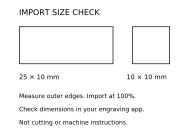
Measure the marked geometry.
- Import
dimension-check.svgat original size into the shop’s normal software. Record the exact software/version and every scale or unit option used. - Measure the outer edges of the marked 25 × 10 mm rectangle and 10 × 10 mm square. These targets use filled geometry so stroke-width interpretation does not alter the target dimensions.
- Do not measure the whole SVG selection. The calibration document is 50 × 35 mm; the selection may instead report the ink bounds. Likewise, plate SVGs have a 76.2 × 25.4 mm page with margins. Some tools discard the page boundary. Do not stretch all artwork to that page size; verify positioning and jig alignment separately.
- Import normal, accented and long-name plates. Check outlines, counters, punctuation, all fields and placement against the matching proof. These are filled outlines, not single-stroke engraving fonts.
- An experienced operator selects machine settings and a suitable scrap material, runs one test plate, then records actual measurements and the shop’s tolerance. This kit provides no cutting, laser-power, speed, toolpath or material settings.
A wrong or missing recipient, silent character substitution, clipping, revision mismatch or measurement outside the shop’s declared tolerance blocks acceptance. A passing run applies only to the recorded setup; it does not establish universal compatibility.
Record what actually happened.
Nothing is pre-checked. This page does not upload or save entries. Print the completed page or use the CSV worksheet. Use a shop code and fictional job reference instead of customer information.
| Measurement | Expected | Measured (mm) | Result |
|---|---|---|---|
| Rectangle width · outer edge | 25 mm | ||
| Rectangle height · outer edge | 10 mm | ||
| Square width · outer edge | 10 mm | ||
| Square height · outer edge | 10 mm |